I Built My Own Local Noise Cancelling App for macOS
I take a lot of calls. My mic picks up everything: the fan, the keyboard, the room. The usual fix is a subscription tool that sends your microphone audio to a server, cleans it there, and sends it back. I did not love that idea. Your microphone is the single most private sensor on your machine, and routing it through somebody else's infrastructure to remove a fan noise felt like a bad trade.
So I built my own. It is called Let Me Hear, it runs entirely on my Mac, and nothing it hears ever leaves the machine.
Download
Download Let Me Hear 1.0.0 for macOS (31 MB disk image)
Later versions will always be on the releases page.
Requires macOS 14 or newer on Apple silicon.
SHA-256 of the disk image:
3bd2a1c14e283574f1abaed7bb7af45a92ca74693220451b28cbe3fde00866b4
To check what you downloaded actually matches:
shasum -a 256 Let-Me-Hear-1.0.0-arm64.dmg
Installing It
- Open the disk image and drag Let Me Hear into your Applications folder.
- Launch it. It appears in the menu bar as a small arcs mark, not in the Dock.
- Allow microphone access when macOS asks.
- Open the panel and click Install in the Virtual Devices section, then approve the administrator prompt. This copies the audio driver into
/Library/Audio/Plug-Ins/HALand restarts CoreAudio. macOS requires an administrator for every virtual audio device, not just this one. - Both devices should then read Available.
- In your call app, set the microphone to Let Me Hear Microphone.
That last step is the one people miss. The app can be running and cleaning perfectly, but if your call app is still pointed at the built in microphone then nobody hears the difference.
What It Actually Does
Let Me Hear sits in the menu bar and puts itself between your real microphone and every app that wants to use one.
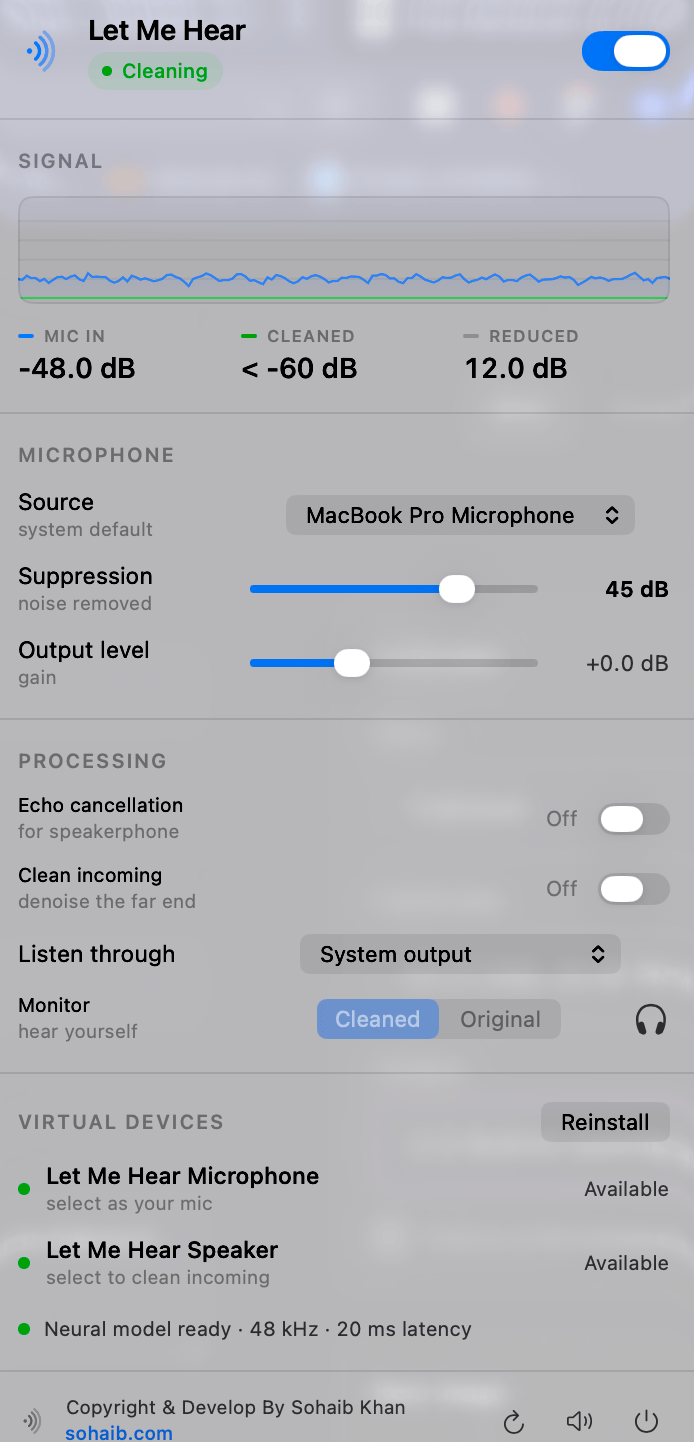
It creates a virtual microphone called Let Me Hear Microphone. You select your real mic inside the app, then select the virtual one in Zoom, Google Meet, Teams, Discord, or whatever you use. Your app never talks to the hardware directly. It gets the cleaned signal instead.
The cleaning is done by a neural speech enhancement model running locally on the CPU at 48 kHz. It adds about 20 milliseconds of delay, which nobody notices on a call.
The Numbers
I did not want to ship this on vibes, so I measured it. I played broadband noise into the room and recorded the physical microphone and the virtual microphone at the same time:
- Physical microphone: -21.1 dB
- Virtual microphone: -65.9 dB
That is 44.7 dB of noise reduction, measured end to end through the actual virtual device that call apps read from. Not a number from a slider, an actual before and after.
Cleaning The Other Person Too
There is a second half to this that most tools skip. Noise suppression normally only cleans what you send. If the person on the other end is sitting in a noisy cafe, that is your problem to endure.
So the app also creates a virtual speaker called Let Me Hear Speaker. Route your call app's output into it and the incoming audio gets run through its own instance of the same model before it reaches your real speakers. It costs a second model instance worth of CPU, so it is off by default, but it is there when you need it.
Things I Care About In The Interface
It is a menu bar panel, not an app window. The centrepiece is a live graph of your input level against the cleaned level over the last few seconds. The gap between the blue line and the green line is the noise being removed, as it happens. You can watch it work.
Everything is reported in real units. Suppression is shown as a decibel limit, not a percentage. Levels are in dBFS. There is a monitor button that lets you hear yourself and A/B between Cleaned and Original, which is honestly the fastest way to tell whether any of this is doing anything.
Credit Where It Is Due
I did not start from zero. The foundation is krasp by Stepan Pilshchikov, released under the MIT license. It is a small, clean, genuinely well written macOS noise suppression utility, and it solved the hardest structural problem for me: a working CoreAudio server plug-in that publishes a virtual microphone, plus a sensible streaming wrapper around the speech enhancement model.
If you want the original, go get it. It is MIT licensed, the code is tidy, and the author clearly knew what he was doing. My fork keeps his copyright notice, as MIT requires, and the license and third party notices ship inside the app bundle.
The model and runtime underneath are third party too, and worth naming:
- DPDFNet, the speech enhancement model, by Ceva, Apache 2.0
- sherpa-onnx, the inference runtime, Apache 2.0
- ONNX Runtime, MIT
What I Changed
This turned into a lot more than a rename. Here is the honest list.
A Second Virtual Device
The original only cleaned outgoing audio. I extended the CoreAudio plug-in from one device to two, adding an output device with its own IO state, its own ring buffer, and a stereo to mono downmix in the render path. That is what makes cleaning incoming call audio possible.
Rewrote The Capture Path
The original captured through AVCaptureSession. I replaced that with raw audio units, which gave me two things: explicit control over which device is used, and the ability to run Apple's voice processing unit for echo cancellation.
It also surfaced a real problem. With a raw audio unit you are on a CoreAudio real time thread, and running neural inference there will cause audible dropouts. So capture callbacks now only hand samples to a bounded buffer, and a dedicated worker thread does the model work. That split matters more than anything else in the app.
One Output Path
Monitoring and cleaned incoming audio used to own separate output units. They now share a single mixing bus with one owner, which removed a whole class of "who is playing what to which device" bugs.
Signing And Packaging
The original shipped unsigned developer builds. This one is signed with a Developer ID certificate, with hardened runtime enabled, a secure timestamp, and a stable designated requirement. Library validation stays on, which took some care: the vendored dylibs get re-signed with the same team ID rather than being granted an entitlement exception. The build fails loudly if any of that is wrong instead of quietly shipping a bad artifact. There is a signed disk image target and a notarization script too.
Safer Shared Memory
The app and the audio plug-in talk through mmapped ring buffers. I moved the layout into a single C header used by both sides, with compile time assertions so a layout change becomes a build error instead of corrupted audio. File permissions went from world writable to 0644, and there is now an explicit rule about which side owns creating each ring, because the app runs as you and the plug-in runs inside coreaudiod as a different user.
A Bug Worth Mentioning
For a while the app looked like it was working and was not. The pipeline was only started when the menu panel was first opened, so after any relaunch it would sit there with the switch showing enabled while callers heard the raw microphone. A menu bar utility has to work with its panel closed. It starts at launch now.
I am mentioning it because it is exactly the kind of bug that testing in the UI never catches. You open the panel to check, and opening the panel is what fixes it.
What Is Not Solved Yet
Echo Cancellation
I wanted proper speakerphone echo cancellation so I could use the Mac mic and Mac speakers without the other person hearing themselves. Apple ships a voice processing audio unit that does excellent echo cancellation. I measured it removing a speaker tone almost completely.
The problem is what else it does. While that unit is active, macOS attenuates all other audio on the output device by about 40 dB. I measured 39.9 dB. So the other person's voice becomes almost inaudible, which is a worse problem than the one I was solving. I tried the documented ducking configuration at every level, and I tried routing playback through the voice unit itself so it would count as voice rather than other audio. That second idea made it 26 dB worse.
So echo cancellation is off by default and clearly labelled. The next step is a proper adaptive echo canceller with a known reference signal, which this app is unusually well placed to do, because when incoming audio is routed through the virtual speaker the app already knows exactly what went to the speakers.
Other Honest Gaps
- The build is arm64 only. It runs on Apple silicon. Only the vendored runtime is universal.
- It is signed but not notarized, because notarization needs an Apple ID credential I have not wired in. A locally built app installs without a Gatekeeper prompt anyway, so this only matters for distributing it to another Mac.
- Target speaker isolation, pulling one enrolled voice out of a room with several people talking, is not attempted. That is a genuine research problem, not a feature flag.
Why Bother
Because the whole thing runs on my laptop, the privacy question disappears. There is no account, no subscription, no server, and no audio leaving the machine. It is a signed app and a CoreAudio plug-in, and when I close it my microphone goes back to being an ordinary microphone.
MIT licensed foundations are a genuinely good thing. Someone wrote a careful little utility, put it out under a license that let me take it apart and rebuild it around a different set of needs, and I got to skip the hardest part. That is worth saying out loud.
Was this worth your time?