Testreel: Turn Any GitHub Repo Into a Tested, Scored YouTube Video (Free and Open Source)
Picture this. You paste a GitHub link, walk away to make coffee, and come back to a finished YouTube video of that project being installed, started, clicked through and scored. It has a voiceover, three thumbnails, a title, a description and chapters. Nobody typed a script. Nobody recorded a screen.
That tool exists now, it runs on your own computer, and today I am releasing it as open source for everyone. It is called Testreel, and the code is free under the MIT license at github.com/sohaibwcws/testreel. Download it, break it, improve it, and tell me what you think.
What Is Testreel?
The short version
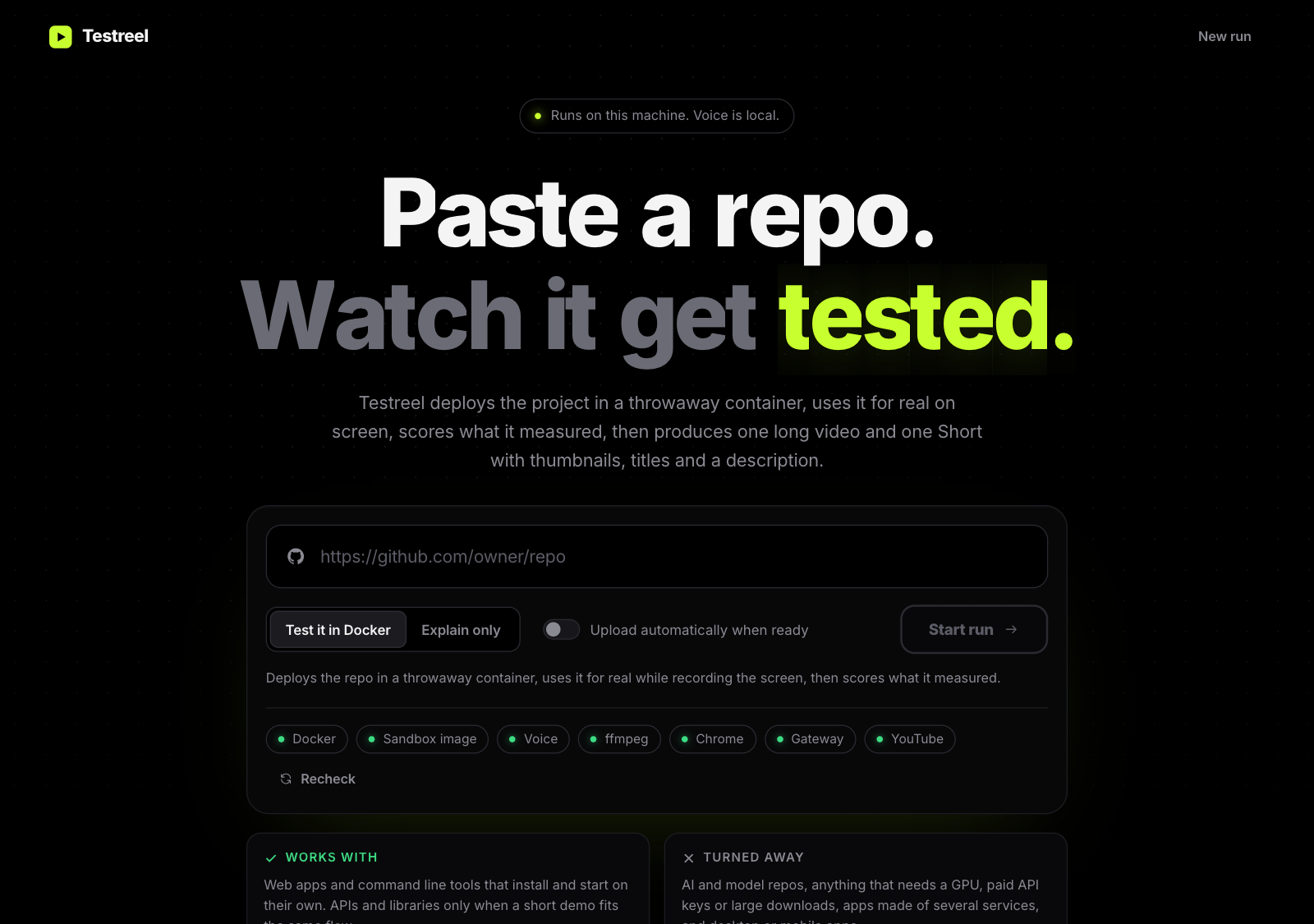
Testreel takes a GitHub repository URL and does the whole job of a tech reviewer. It installs the project in a throwaway Docker container, starts it, uses it like a real person would, measures what happened, scores it, and then produces a video package for YouTube: one long video of up to 10 minutes and one vertical Short of up to 59 seconds. Each comes with three thumbnails, title options, a description, chapters and tags.
Everything runs on your machine. The narration is a local voice model, so you are not paying a text to speech service. The only outside services are GitHub, to read the repo, the chat model you choose to connect, and YouTube, if you decide to upload.
Why I built it
I wanted to make videos about open source projects, and I kept running into the same wall. A good review means actually installing the thing, hitting the rough edges, recording the screen, writing a script, recording a voice, editing, and designing a thumbnail. That is hours of work for one video, and most of it is repetitive.
So I asked a simple question. What if the machine did the boring parts honestly? Not a summary of the README with stock footage on top, but a real test with real footage. That question turned into Testreel.
Why Most Repo Reviews Are Guesswork
Here is the dirty secret of a lot of automated "AI review" content. The tool reads the README, paraphrases it with confidence, and calls it a review. It never ran the code. If the install is broken, the video will not tell you, because nobody ever found out.
Testreel starts from the opposite rule: if it was not measured, it does not get claimed. The install time, the boot time, the health check, the memory use, the dependency audit and the repo's own tests are all measured by plain code inside the container. A model never gets to guess a number. When a model writes the explanation, every figure it quotes is checked against the real data before it goes into the script.
And when the automated user cannot tell whether something worked, the video says "the automated check could not confirm this" instead of shouting that it found a bug. That honesty is a feature, not a limitation.
How Testreel Works, Step by Step
Paste a link and get an answer right away
The moment you paste a repo URL, Testreel runs the same triage that a real run starts with and tells you whether it can handle that repo. If it cannot, you get a plain sentence explaining why, and the Start button stays off, so you never waste twenty minutes finding out a project needed a GPU.
The verdict is remembered per repo version. That means the check on the page and the run that follows always agree. I added that after watching a borderline repo get a yes from one model call and a no from the next, which was a good reminder that you should never trust two separate guesses to match.
A throwaway Docker container does the testing
The project is cloned and installed inside a locked down container. It gets no mounted folders from your computer and no secrets. All Linux capabilities are dropped, it cannot gain extra privileges, and it is capped at 6 GB of memory, 4 CPUs and a disk limit. When the run finishes, the container, its volumes and the build cache are deleted.
One honest note: the container does have internet access, because installs need it. Treat it as strong isolation from your files, not as permission to run code you would be afraid to run anywhere.
Scores that come from measurements
Testreel produces four scores, each from 0 to 10: works, quality, effort and speed. They are computed in code from the measured results, and the formulas are written down in the docs so you can check them. The average becomes a verdict. Seven and above is USE, five to seven is WATCH, and below five is SKIP.
A real browser, a real cursor
For web apps, Testreel drives a real headless Chrome on your machine against the running app. It carries out each flow once to judge what truly happened on the page, then records the best flows with a visible cursor and click ripples. For command line tools, it replays the actual commands and the actual output in a terminal scene. No fake typing, no invented output.
Video, voice and thumbnails
The render engine is built from scratch. Scenes are written in HTML and canvas, captured frame by frame by parallel Chrome workers, and encoded with ffmpeg together with the voice track and sound effects. The look is a dark OLED style with kinetic text, animated bars, a scorecard and a verdict. The voice comes from Kokoro, a local model, and the video description clearly says the voice is AI generated.
See It in Action: A Real Run on transitions.dev
Talk is cheap, so here is a real result. I pointed Testreel at transitions.dev, a popular collection of reusable CSS transitions.
The measured times were tiny: the clone took 1.9 seconds, the start command 0.6 seconds, and the app booted in 0.5 seconds. Testreel then tried five flows in a real browser, and four of them worked. The fifth, a search for a prototypes page, never navigated where it should have, and the video says so plainly. The final scorecard landed at 9.0 out of 10, a USE verdict, with the failed flow and the missing controls listed as limitations.
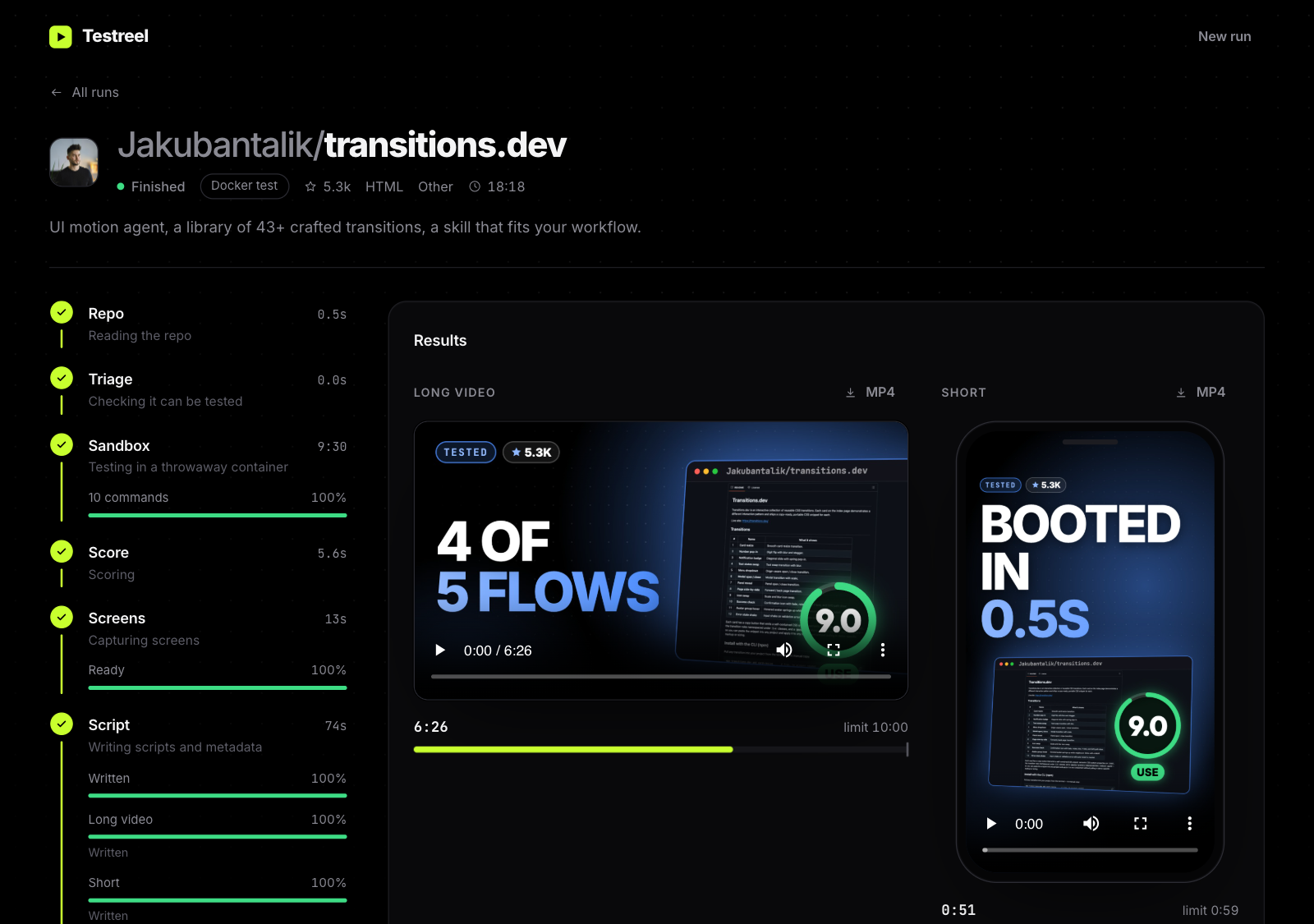
The whole run, from paste to finished long video, Short and thumbnails, took about 18 minutes on my M1 Max MacBook. I did nothing in between. Another run on the GSAP animation library scored a perfect 10 with no install step at all, because it can be imported straight from the repo files.
Find Repos Worth Testing With the Trending List
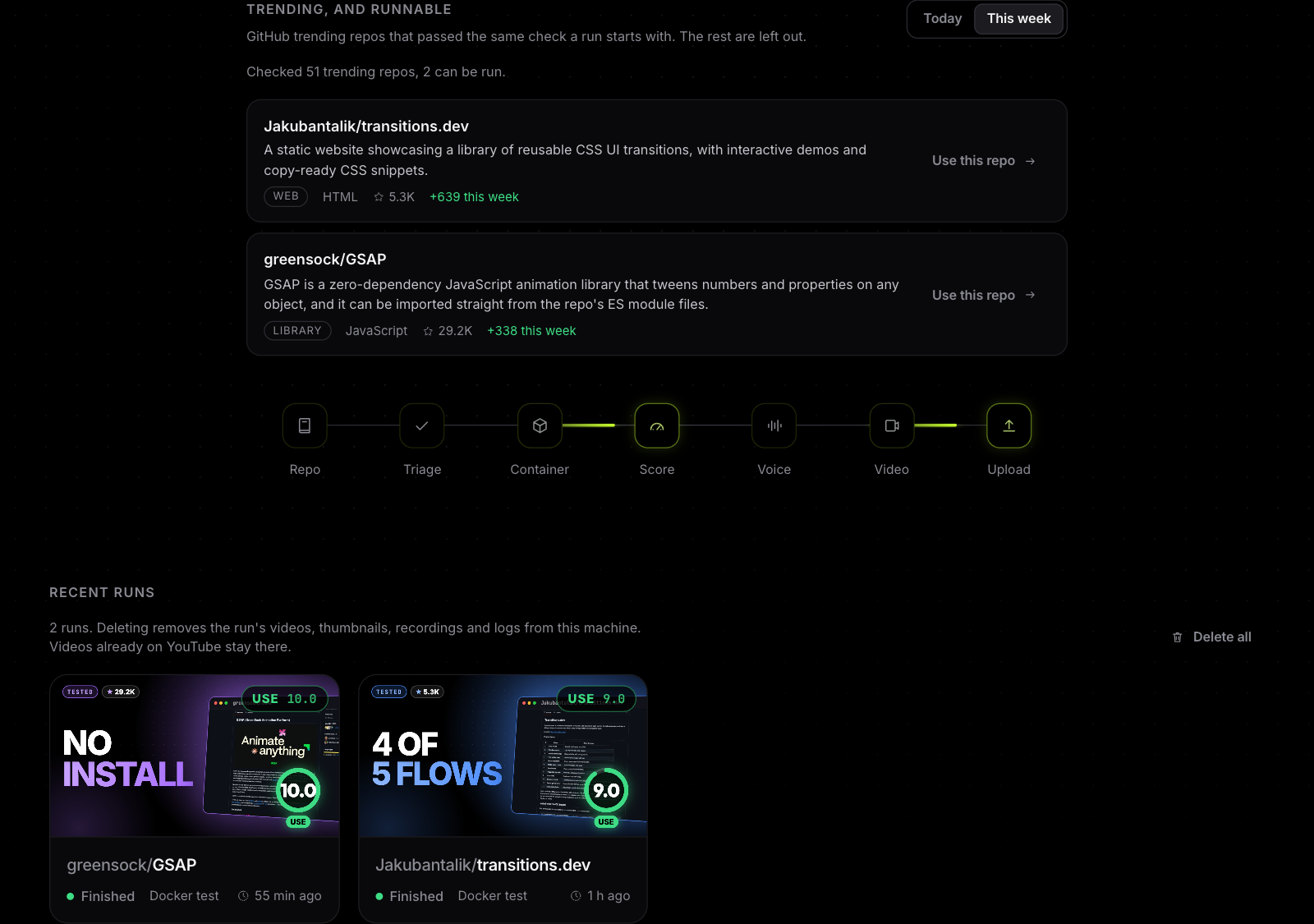
Here is a feature I am a little too proud of. Below the form there is a section called Trending, and runnable. Testreel reads GitHub trending for today or this week, runs the same check on each repo, and shows only the ones it can actually test, each with a Use this repo button.
When I tested it, it checked 51 trending repos and only a handful passed. That tells you something about the trending page. Plenty of hot repos are AI projects, GPU tools, desktop apps or multi service systems, and those are outside what a one click container test can handle. The list quietly filters all of that noise away so you start from repos that will work.
A small warning for fellow tinkerers: GitHub has no trending API, so Testreel reads the public trending page. If GitHub redesigns that page, this feature will need a fix.
What Testreel Will and Will Not Run
I would rather tell you the limits up front than have you discover them.
What it handles well
Web apps and command line tools written in JavaScript or Python, plus APIs and libraries when a short demo fits. Think small React apps, static file servers and developer utilities.
What it refuses, and why
AI and machine learning projects, anything that needs a GPU or a huge model download, projects that need paid API keys, apps made of several services such as a compose file with databases, desktop and mobile apps, repos over 500 MB, and languages the container has no compiler for, like Go, Rust or Java. Each refusal comes with a clear reason. If you want Go or Rust support, adding the toolchains to the sandbox image is the biggest upgrade on the wish list, and pull requests are welcome.
Is It Safe and Private?
I care about this part, so here are the facts. The web interface only listens on your own computer, never on the network, and it refuses requests from other websites. No credential has a default value, and nothing secret is stored inside the project folder. Your keys live in a local environment file that git ignores, and the YouTube token is saved in your home folder with owner only permissions.
If you turn on automatic upload, it always uploads as private. Going public is always a deliberate click by you.
Upload to YouTube in One Click
When a run finishes, each video gets its own upload card with a privacy choice and an optional scheduled publish time. You bring your own Google OAuth client, so nobody else can ever post to your channel. The setup guide in the repo walks through it, including two quirks that surprise people: Google expires tokens after seven days while your consent screen is in testing mode, and brand new API projects may only be allowed to upload private videos until they pass Google's audit.
Download Testreel and Try It Today
Setting it up takes about ten minutes plus download time. You need Bun, Docker Desktop, ffmpeg, Chrome for Testing, Python 3.10 to 3.12, and a chat model endpoint that speaks the OpenAI style API.
Here is the short version for macOS:
brew install oven-sh/bun/bun ffmpeg [email protected]
git clone https://github.com/sohaibwcws/testreel.git && cd testreel
bun install
bunx puppeteer browsers install chrome
bash scripts/setup-voice.sh
cp .env.example .env
bun run start
Fill in the three gateway values in your .env file, open the local page it prints, paste a repo, and press Start. The full instructions, a settings reference and a troubleshooting table are in the setup guide on GitHub. Testreel is tested on macOS with Apple Silicon. Linux has not been tried yet, and I would love to hear how it goes if you try.
Frequently Asked Questions
Is Testreel really free?
Yes. The code is open source under the MIT license. You pay only for whatever chat model you connect, and the voice model runs locally for free.
Do I need a YouTube channel to use it?
No. Without YouTube set up, Testreel still creates the videos, thumbnails, titles and descriptions as files, and you can upload them yourself anywhere you like.
Which AI model should I connect?
Any model behind an OpenAI style chat endpoint works, including OpenAI, OpenRouter, a proxy in front of Claude, or a local server like Ollama. A strong model gives noticeably better test plans and scripts, because the model classifies the repo, drives the browser tests and writes the narration.
Can it review my own project?
Absolutely, as long as it is an ordinary app that installs and starts on its own. It is a surprisingly good way to find out how your own README and install steps hold up for a stranger.
Final Thoughts: Come Break It With Me
I built Testreel because I wanted reviews that were earned by actually running things. Seeing a machine install an unknown project, click through it, find a real bug and then explain it out loud still feels a bit like magic to me, and I want you to feel that too.
Now it belongs to everyone. Head to the Testreel repository on GitHub, give it a star if you like it, run it on a project you care about, and open an issue or a pull request with whatever you find. Share your best video, your weirdest failure, or your idea for the next feature. Let's make repo reviews honest, fast and a lot more fun.
Was this worth your time?